

English
Audio
This setting can be toggled. (If your clip has audios, this is enabled by default.)
You can right-click or middle-click any setting slider to reset it.
Toggles
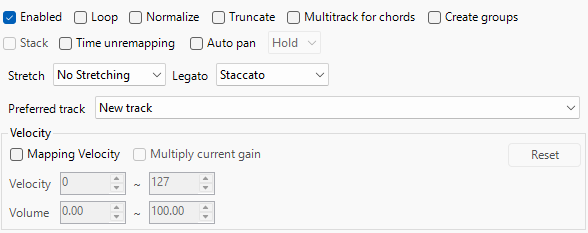
Loop
Makes the clip loop if applicable.
Normalize
Normalize the audio.
INFO
This is useful if the audio is quiet.
Truncate
Trims to the MIDI note instead of stretching.
IMPORTANT
This conflicts with Legato.
Multitrack for Chords
Generates multiple audio tracks for chords.
Create Groups
Groups the Video and Audio Clips represented by the MIDI note(s).
INFO
This makes it easier to change the position or length of the audio and video clips simultaneously.
Stack
Creates stacked audio clips on separate tracks when the MIDI contains multiple tracks.
IMPORTANT
Only works when multiple MIDI tracks are selected.
Time unremapping
Disables all forms of time remapping of the clip! The start time will NOT reset as it will continue the clip from where it left off every note.
Auto Pan
Pans the Audio using Envelope Automation.
IMPORTANT
This is dependent on your pan automation from your MIDI channel, not the notes.
Stretch
Makes the clip stretch if applicable.
- None
- Does not apply stretching to the clip.
- Flex and Extend
- Stretches the clip completely.
- Extending Only
- Stretches clip out.
IMPORTANT
This works best with MIDI Notes that are longer than the audio clip.
- Stretches clip out.
- Flexing Only
- Stretches clip in.
IMPORTANT
This works best with MIDI Notes that are shorter than the audio clip.
- Stretches clip in.
Legato
Extends the audio outside the note’︀s length with any length chosen.
- Staccato
- No Extension.
- Up to 1 Beat
- Extends out 1 Beat
IMPORTANT
This will only work if the next clip is less than 1 beat apart.
- Extends out 1 Beat
- Up to 1 Bar
- Extends out 1 Bar
IMPORTANT
This will only work if the next clip is less than 1 bar apart.
- Extends out 1 Bar
- Unlimited
- Extends Unlimitedly.
IMPORTANT
This conflicts with Truncate.
Preferred Track
Creates a new track(s) or uses the track selected for generation.
Velocity
Settings to assign gain values relative to the MIDI notes.
- Mapping Velocity
- Assigns the Notes to the Velocity from the MIDI File.
- Multiply Current Gain
- Toggling multiplies the existing gain instead.
- Velocity
- The Value of Velocity from Minimum to Maximum.
- Volume
- The Value of Volume from Minimum to Maximum.
WARNING
Do not use the same value in both minimum and maximum values for Velocity and Volume.
- Reset
- Resets the settings to default.
Tuning
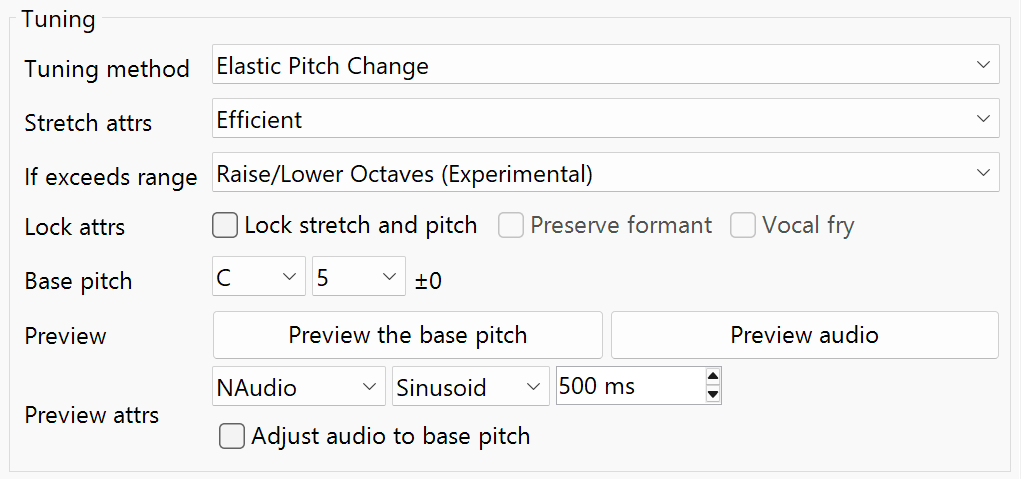
Tuning Methods
- No Tuning
- No Pitch Effect.
- Pitch Shift Audio Effect
- Uses the “︀Pitch Shift”︀ Plugin (default for Vegas 13–15).
- Elastic Pitch Effect
- Uses the Elastic Efficient Method (by default).
- Classic Pitch Effect
- Uses the Classic Stretch Method.
- Scaleless Tuning
- Locks the Stretch and Pitch.
- Granular Oscillator
- Makes the sample super short and plays it, generating a pulse sequence corresponding to the pitch while creating a continuous pitch by exploiting the perception fusion effect of fast pulses.
If the pitch exceeds the range
- Switch to pitch shift plugin
- Repeatedly uses the pitch shift plugin for exceeding limits.
IMPORTANT
Out of range notes will slow down the generation.
- Repeatedly uses the pitch shift plugin for exceeding limits.
- Raise / Lower octaves
- Shifts by octaves to keep the note inside ±24 semitones (safest option).
- Raise / Lower octaves (Experimental)
- Allows a much larger range, up to roughly semitones.
INFO
If “︀Lock Stretch to Pitch”︀ is on, it can go as low as semitones (upper limit stays +24).
DANGER
Use this at your risk! This method can CRASH Vegas Pro.
- Allows a much larger range, up to roughly semitones.
- Dock at Top / Bottom
- Forces the note to the highest or lowest pitch still inside the normal range.
- Silent
- Mutes notes that are out of range.
Lock Attributes
- Lock Stretch and Pitch
- Adjust the stretch to change the pitch (Resample).
- Reserve Formant
- Locks Formant, works only with “︀Mono”︀ and “︀Professional”︀
INFO
This locks formant so you get that “︀monophonic”︀ effect.
- Locks Formant, works only with “︀Mono”︀ and “︀Professional”︀
- Vocal Fry
- Forces the sample to be 1 tick long.
INFO
Only usable with Granular Oscillator.
- Forces the sample to be 1 tick long.
Base Pitch
Controls the base pitch for previewing and adjusting the Audio Track Event.
- Note Name
- Controls the note name used for the base pitch.
- Octave
- Controls the note octave used for the base pitch.
Preview
- Preview the Base Pitch
- Previews the base pitch.
- Preview Audio
- Previews the track event audio.
Preview Attributes
Tune generating methods for previewing the base pitch.
IMPORTANT
NAudio is the default method and is preferred.
- Adjust Audio to Base Pitch
- Adjusts the clip track event’︀s audio to the base pitch.
INFO
This is useful for older styles of remixes.
Parameters
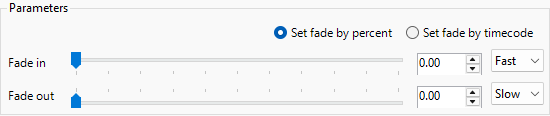
- Set Fade by Percent
- Sets the Value Measure to Percent Value.
- Set Fade by Timecode
- Sets the Value Measure to Timecode Value.
Fade
Fade in
Length and Fade Type of the Audio Fade in on the Track Event.
Fade out
Length and Fade Type of the Audio Fade out on the Track Event.