

English
Sonar
Sonar (Motion Graphics Generation Feature) is for creating beat-style visuals for Drums.
This setting can be toggled.
WARNING
This requires a Drum Kit in the MIDI, you can’︀t use this with samples.
Toggles
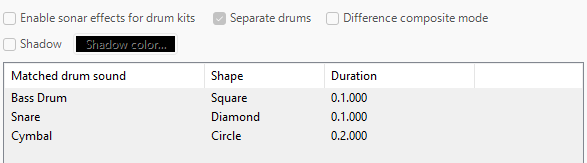
- Separate Drums
- Makes the drums’︀ visuals generate on multiple layers.
- Different Composite Mode
- Makes the layers generated with difference compositing (blending).
- Shadow
- Generates visuals with a shadow.
- Shadow Color
- Changes the shadow color.
Editor

- Reset
- Delete (Selection)
- Move Up (Selection)
- Move Down (Selection)
- Create New
Parameters
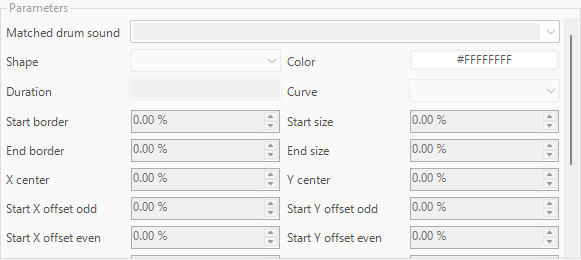
- Matched Drum Sound
- The value of the drum sound used for the generation.
IMPORTANT
This should match what the individual drum is in your MIDI.
- The value of the drum sound used for the generation.
- Shape
- The shape of the visual.
- Color
- Controls the color of the visual.
- Duration
- The value of the duration for the visual.
- Curve
- The value of the keyframe type.
- Start Border
- The value of the starting size of the border.
- End Border
- The value of the ending size of the border.
- Start Size
- The value of the starting overall size.
- End Size
- The value of the ending overall size.
IMPORTANT
The center is where the visual will end, this will affect all other parameters.
- X Center
- The value of the center horizontal position.
- Y Center
- The value of the center vertical position.
IMPORTANT
These values are the first values to be used for keyframing.
- Start X Offset Odd
- The value of the X starting position for every odd visual.
- Start Y Offset Odd
- The value of the Y starting position for every odd visual.
- Start X Offset Even
- The value of the X starting position for every even visual.
- Start Y Offset Even
- The value of the Y starting position for every even visual.
IMPORTANT
These values are the additional values to be used for keyframing, which creates interpolation.
- Prestart X Offset Odd
- Additional value of the X starting position for every odd visual.
- Prestart Y Offset Odd
- Additional value of the Y starting position for every odd visual.
- Prestart X Offset Even
- Additional value of the X starting position for every even visual.
- Prestart Y Offset Even
- Additional value of the Y starting position for every even visual.
- Start Rotation Odd
- The value of the starting rotation for every odd visual.
- Start Rotation Even
- The value of the starting rotation for every even visual.
- Fade In
- The value of the fade in.
- Fade Out
- The value of the fade out.
- Fade In Curve
- The keyframe type of the fade in.
- Fade Out Curve
- The keyframe type of the fade out.