

English
Visual
Also known as Video or PV.
This setting can be toggled. (If your clip has visuals, this is enabled by default.)
You can right-click or middle-click any setting slider to reset it.
Toggles
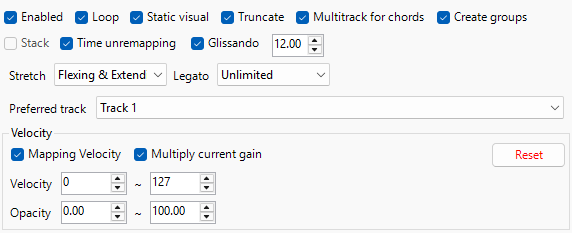
Loop
Makes the clip loop if applicable.
Static Visual
Makes the clip freeze at the start of the clip.
IMPORTANT
This gives you a static visual.
Truncate
Makes the clip freeze at the end of the clip.
WARNING
Not at the end of the note.
Multitrack for Chords
Generates multiple video tracks for visuals.
INFO
This is very useful for making chord visuals easier.
Create Groups
Groups the video clips and the related audio clips together.
INFO
This is useful when used with Multitrack for Chords.
Glissando
Creates a Swirl Effect if the note pitch bends or slides.
Stack
Creates stacked video clips on separate tracks when the MIDI contains multiple tracks.
IMPORTANT
Only works when multiple MIDI tracks are selected.
Time Unremapping
Disables all forms of time mapping of the clip! The start time will NOT reset as it will continue the clip from where it left off every note.
Stretch
Makes the clip stretch if applicable
- None
- Applies no stretching to the clip.
- Flex and Extend
- Stretches the clip completely.
- Extending Only
- Stretches clip out.
IMPORTANT
This works best with MIDI Notes that are longer than the Visual clip.
- Stretches clip out.
- Flexing Only
- Stretches clip in.
IMPORTANT
This works best with MIDI Notes that are shorter than the Visual clip.
- Stretches clip in.
Legato
Extends the clip beyond the note’︀s duration.
- Staccato
- No Extension.
- Up to 1 Beat
- Extends out 1 Beat
IMPORTANT
This will only work if the next clip is less than 1 beat apart.
- Extends out 1 Beat
- Up to 1 Bar
- Extends out 1 Bar
IMPORTANT
This will only work if the next clip is less than 1 bar apart.
- Extends out 1 Bar
- Unlimited
- Extends Unlimitedly.
Preferred Track
Creates a new track(s) or uses the track selected for generation.
Velocity
Settings to assign opacity values relative to the MIDI notes.
- Mapping Velocity
- Assigns the Notes to the Velocity from the MIDI File.
- Multiply Current Gain
- Toggling multiplies the existing gain instead.
- Velocity
- The Value of Velocity from Minimum to Maximum.
- Opacity
- The Value of Opacity from Minimum to Maximum.
WARNING
Do not use the same value in both minimum and maximum values for Velocity and Opacity.
- Reset
- Resets the settings to default.
Effects

Visual Effects
Make your visuals whatever you want. The default is Horizontal Flip.
Initial Step
The Value Setting for the visuals.
IMPORTANT
This will differ based on the visual you selected.
Advanced - PV Rhythm & Cadence Dynamic Pulsing Visual Effect
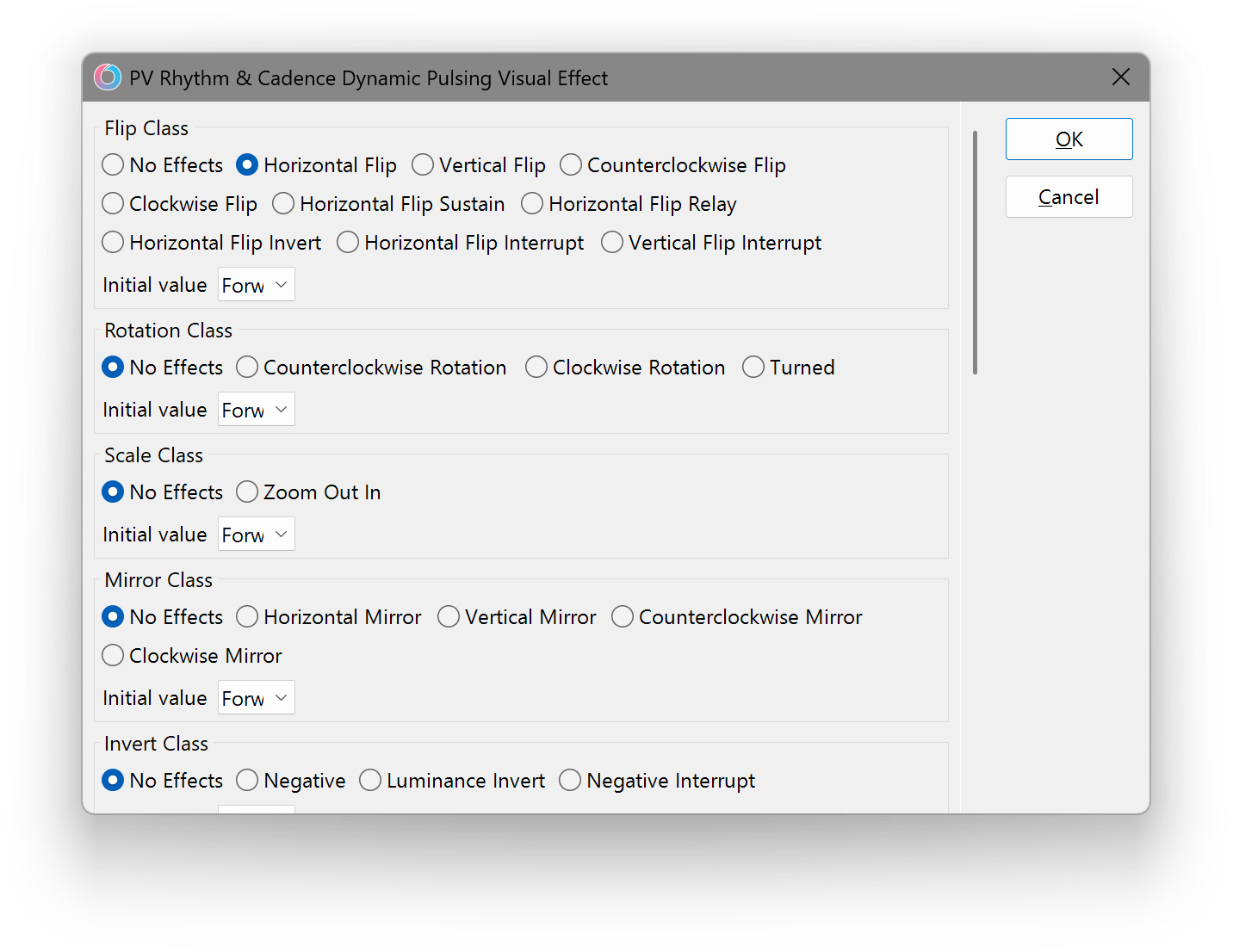
- Flip Class
- Selects a Visual type from the Flip Class.
- Rotation Class
- Selects a Visual type from the Rotation Class.
- Scale Class
- Selects a Visual type from the Scale Class.
- Mirror Class
- Selects a Visual type from the Mirror Class.
- Invert Class
- Selects a Visual type from the Invert Class.
- Hue Class
- Selects a Visual type from the Hue Class.
- Monochrome Class
- Selects a Visual type from the Monochrome Class.
- Time Class
- Selects a Visual type from the Time Class.
- Time Class 2
- Selects a Visual type from the Time Class 2.
- Expansion & Compression Class
- Selects a Visual type from the Expansion & Compression Class.
- Swing Class
- Selects a Visual type from the Swing Class.
- Blur Class
- Selects a Visual type from the Blur Class.
- Wipe Class
- Selects a Visual type from the Wipe Class.
Parameters
Various Effects for the visual generation.
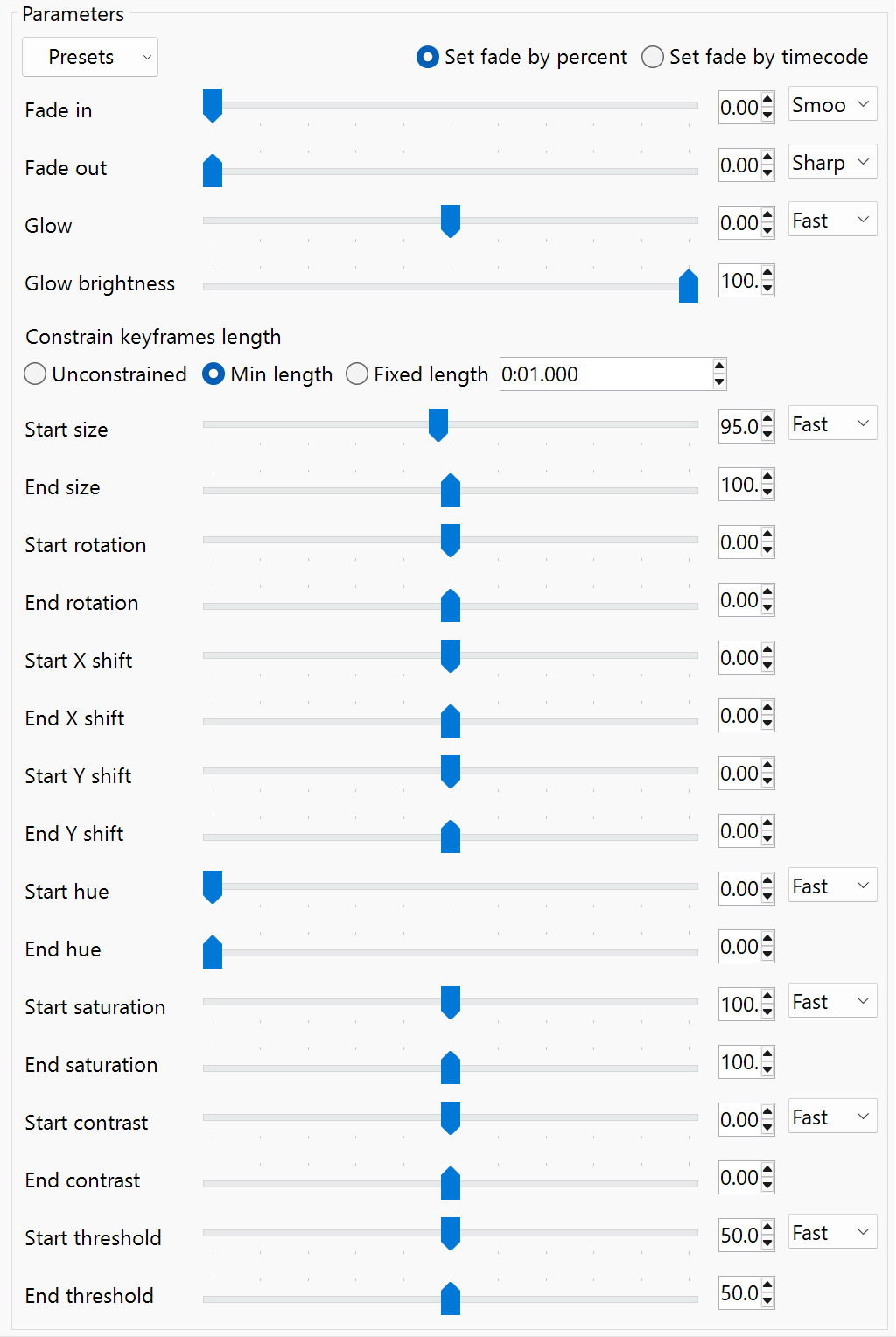
Presets
Premade effect visuals for your convenience.
- Set Fade by Percent
- Sets the Value Measure to Percent Value.
- Set Fade by Timecode
- Sets the Value Measure to Timecode Value.
Fade
Fade in
Length of the Video Fade in on the Track Event.
Fade out
Length of the Video Fade out on the Track Event.
Glow
Glow
Value of the “︀Glow”︀ Effect that adds a glow to your visual!
Glow Brightness
Value of the Glow Brightness in your visual.
Constrain keyframes length
Specifies the length of keyframes to generate for the following properties.
- Unconstrained
- Keyframes will generate normally from start to end of the MIDI note.
- Min length
- Keyframes will never be shorter than the set length. If the note is shorter, they get truncated.
- Fixed length
- Keyframes are forced to exactly the set length.
Transform
Start Size
Value of the Starting Size for Pan/Crop.
INFO
Anything over 100% will reduce the video clip size.
End Size
Value of the Ending Size for Pan/Crop.
INFO
Anything over 100% will reduce the video clip size.
Start Rotation
Value of the Starting Rotation for Pan/Crop.
End Rotation
Value of the Ending Rotation for Pan/Crop.
Start X Shift
Value of the Starting X Shift Position for Pan/Crop.
IMPORTANT
This will make the visual position shift horizontally, depending on the other parameters.
End X Shift
Value of the Ending X Shift Position for Pan/Crop.
IMPORTANT
This will make the visual position shift horizontally, depending on the other parameters.
Start Y Shift
Value of the Starting Y Shift Position for Pan/Crop.
IMPORTANT
This will make the visual position shift vertically, depending on the other parameters.
End Y Shift
Value of the Ending Y Shift Position for Pan/Crop.
IMPORTANT
This will make the visual position shift vertically, depending on the other parameters.
Color Grading
Start Hue
Value of the Starting Hue.
End Hue
Value of the Ending Hue.
Start Saturation
Value of the Starting Saturation.
End Saturation
Value of the Ending Saturation.
Start Contrast
Value of the Starting Contrast.
End Contrast
Value of the Ending Contrast.
Start Threshold
Value of the Starting Contrast Threshold.
IMPORTANT
This makes the contrast’︀s depth higher or lower.
End Threshold
Value of the Ending Contrast Threshold.
IMPORTANT
This makes the contrast’︀s depth higher or lower.