

English
Staff Visualizer
Staff Visualizer is for creating Sheet style visuals in a similar fashion to Piano Sheets.
This setting can be toggled. (This is disabled by default.)
IMPORTANT
Requires Visual to be enabled.
Notes Parameters
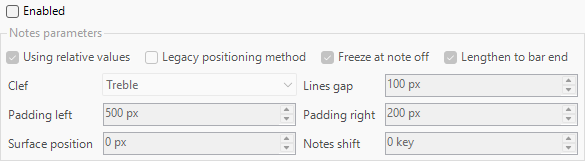
- Using Relative Values
- Uses Values relative to 1920×1080 size.
IMPORTANT
If off, it will use values based on your project size.
- Uses Values relative to 1920×1080 size.
- Legacy Positioning Method
- Uses the old method of placing visuals, uses Track Motion instead for the Notes and Lines.
- Freeze at note off
- Freezes the note upon MIDI note’︀s end.
- Lengthen to bar end
- Extends the clip to the end of the measure.
- Clef
- Controls what the Clef is.
INFO
Treble is for Higher Sounding Notes, Bass is for Lower Sounding Notes.
- Line Gap
- Controls the Pixel Gap for the Visuals and the Sheet.
- Padding Left
- Controls the Value of the Gap Distance from the Left.
- Padding Right
- Controls the Value of the Gap Distance from the Right
- Surface Position
- Controls the Value of the Gap Distance from the Middle Line.
- Notes Shift
- Shifts Notes in the Sheet based on the Value of the Key Change.
Lines Parameters
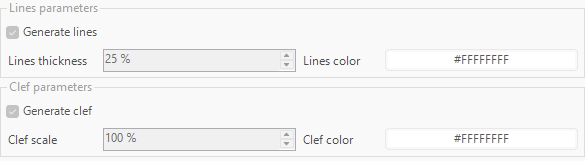
- Generate Lines
- Generates the lines for the Staff.
- Line Thickness
- Controls the size of the Line Thickness in the Staff Sheet.
- Line Color
- Controls the Line Color.
IMPORTANT
Applies when Generate Staff is On.
Clef Parameters
- Generate Clef
- Generates the Clef Symbol at the front beginning of the sheet.
- Clef Scale
- Controls the Clef Symbol scale generation.
- Clef Color
- Controls the Clef Symbol color.