

English
Score
MIDI Configuration
(THIS IS IMPORTANT)
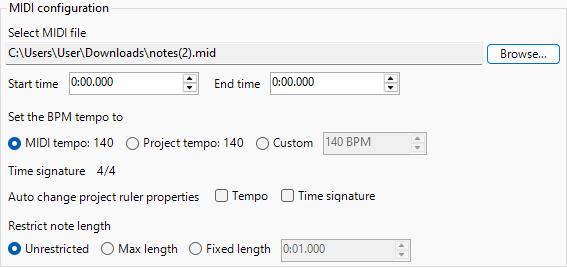
- Requires a MIDI File to make the YTPMV/otoMAD.
- You must select a MIDI file from your computer for the script to generate.
INFO
- This also works with other DAWs that support MIDI exporting.
- In FL Studio, make a copy of your project before you convert it to MIDI.
Start and End Time
Controls the range where the generation of MIDI starts and ends.
TIP
If the start has been set at 0:05.000. The MIDI would generate all notes from the 5th second, and the clips will be generated from the 5th second after where ”︀generate at”︀.
INFO
This will still generate the visuals at the respected note time placements.
BPM Tempo
Controls the BPM the MIDI generates.
- MIDI Tempo
- Uses the MIDI’︀s Tempo.
- Project Tempo
- Uses the current Vegas Project’︀s Tempo.
- Custom
- Uses the Custom Setting.
If the MIDI has changing tempos, the script will adapt and let you select what options you want to do with them.
- Variable MIDI tempo
- Uses the changing tempo.
- Hold
- Notes Generated will stay held to their BPM.
- Linear
- Notes Generated will be based linearly on their BPM.
- MIDI Tempo
- Uses the constant first tempo.
Auto Change Project Ruler Properties
Adjusts the project’︀s measure properties based on the MIDI.
- Tempo
- Uses tempo as the setting.
- Time signature
- Uses time signature as the setting.
- Apply Now
- Automatically applies the MIDI’︀s tempo and time signature without generating the MIDI events.
INFO
Unfortunately, you can not use MIDIs with changing tempos or time signatures, only the first tempo/time signature will be used. Use VariableBPM for variable tempo.
Restrict Note Length
Controls the Note Output Length from the MIDI.
- Unconstrained
- No note output change.
- Max Length
- Notes will be restricted to the length provided.
- Fixed Length
- Notes will attempt to generate to the length provided.
WARNING
This may conflict with Legato even if it is set to “︀Unlimited”︀ in Audio/Visual Settings.
Use MIDI track
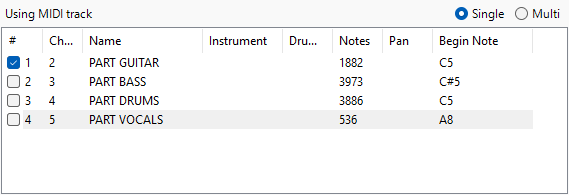
This allows you to select what tracks you want to generate from your MIDI file.
Commands
- Select all
- Selects all tracks.
- Invert Selection
- Inverts your selection.
- Single
- Toggles selecting a single track.
- Multi
- Toggles selecting multiple tracks.
IMPORTANT
Starting Pan is shown, and the letter attributes go as follows:
| Letter Attributes | Starting Pan |
|---|---|
| L | Left |
| R | Right |
| C | Center |
| V | Variable |
Auto Layout Tracks
